Necessary cookies keep the platform secure - those are always on. With your permission we'd also like to use analytics cookies to understand how the site is used. No ads, ever. See our Cookie Policy.
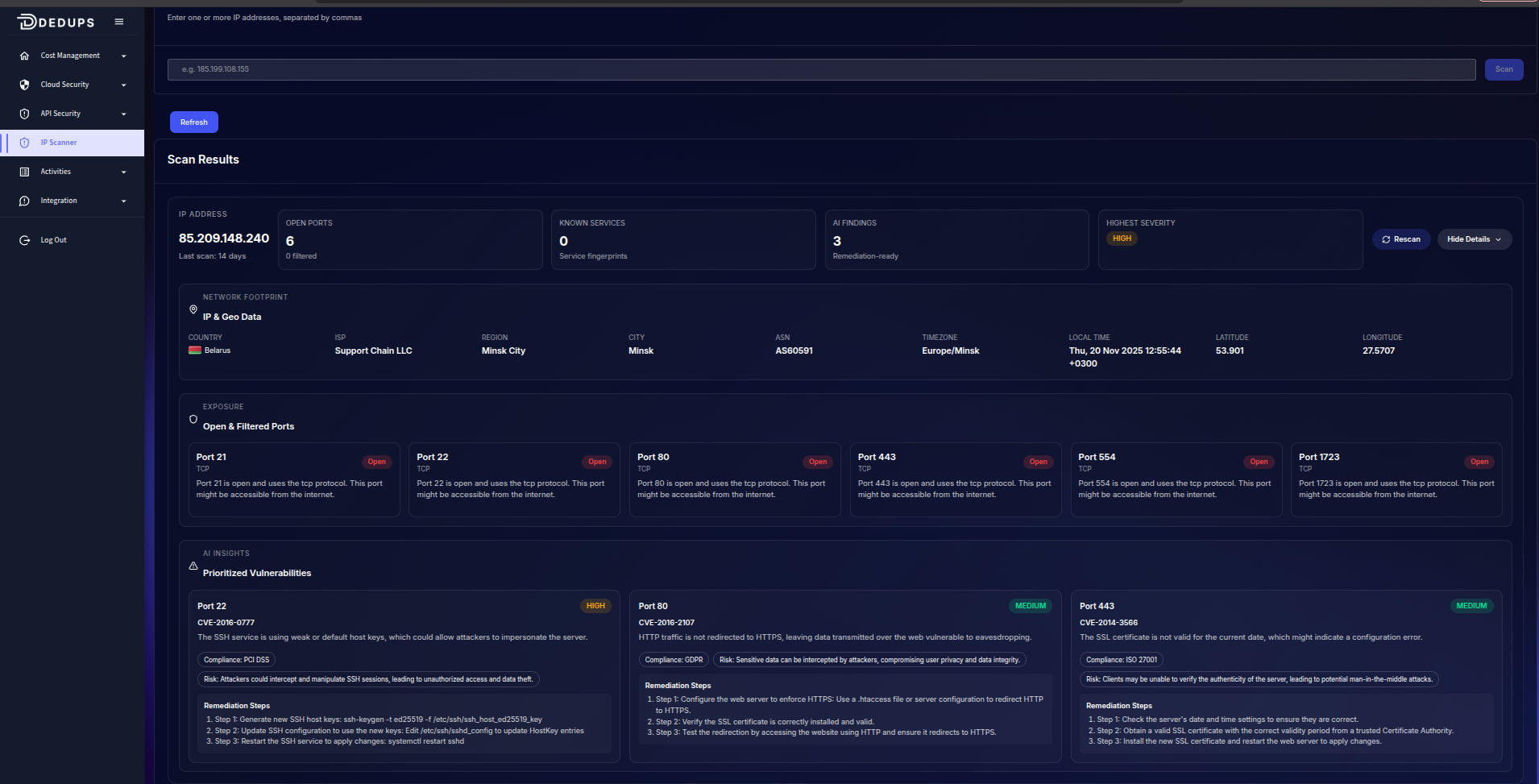
Use the IP Scanner to analyze any public IP address for security exposure.
Simply enter an IP and click Scan to view open ports, vulnerabilities, and network details.
IP Scanner
What the Scanner Checks
1. Open Ports
Identifies which ports are publicly accessible and what services may be exposed.
2. Vulnerabilities
Shows CVEs, severity levels (High/Medium/Low), and quick remediation steps for each risky port.
3. IP Location & Network Info
Displays country, region, city, ISP, ASN, timezone, and coordinates linked to the IP.
How It Works
Enter one or more public IPs.
Click Scan.
Review results including:
Open/filtered ports
Vulnerability insights
Highest severity detected
Location and ISP details
Example Scan Output
A scan result may show:
Open ports such as 22, 80, 443
Associated vulnerabilities with recommended fixes
Country, region, and ISP for the IP
This helps you quickly understand what is exposed to the internet and what needs to be secured.
Ready to get started?
Start securing your cloud infrastructure and optimising costs today.