Security Insight Overview
We are providing a detailed view of findings related to system alerts or security incidents.
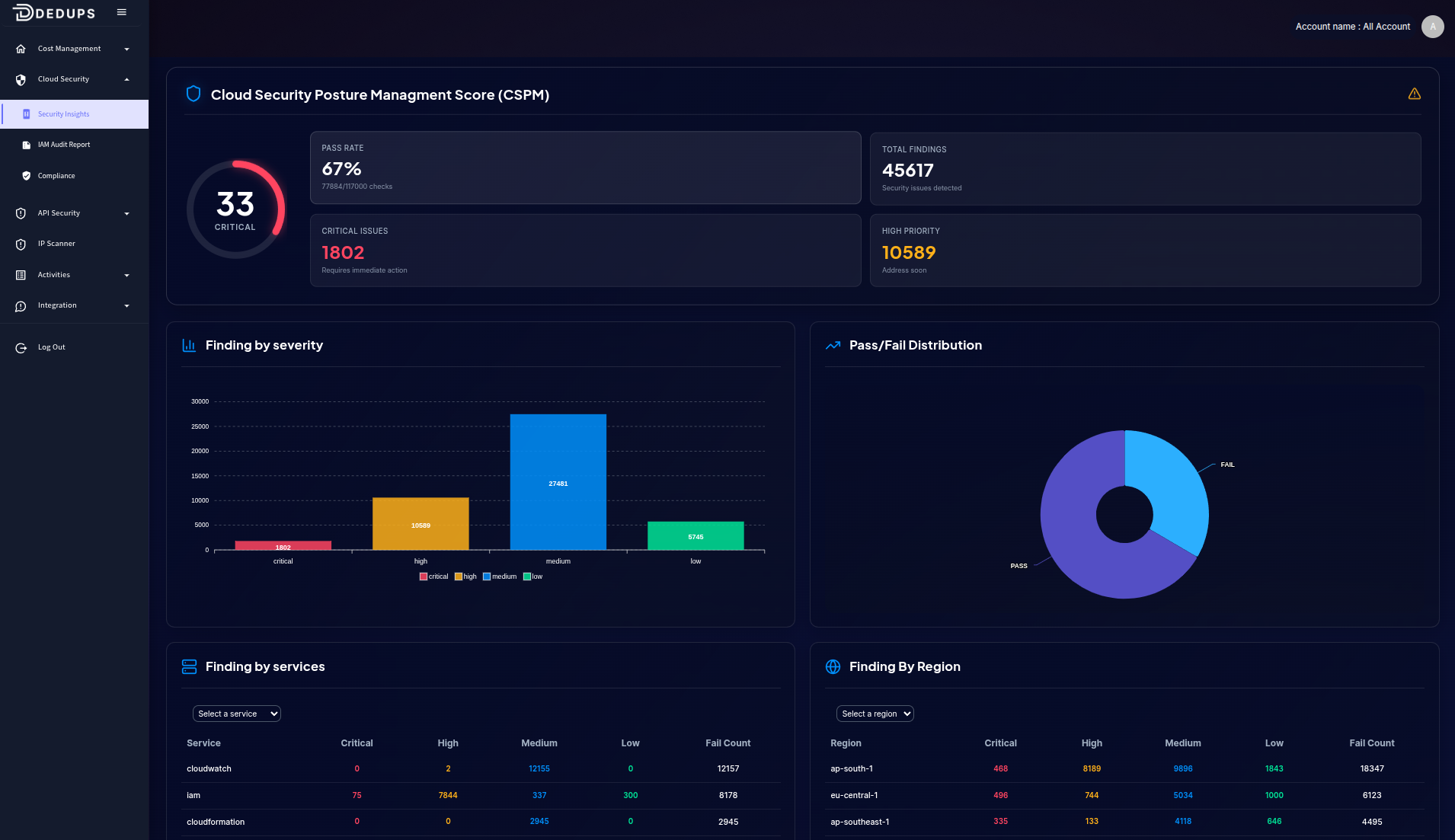
Findings by Severity
Visual Breakdown
A bar chart categorizes findings by severity levels, such as critical, high, medium, and low. This helps prioritize actions based on risk levels, ensuring that the most severe issues are addressed promptly.
Findings Overview
Pie Chart Distribution
Displays the proportion of findings across different severity levels, offering a quick snapshot of the overall security posture. This visual representation helps in understanding the distribution of alerts at a glance.
Detailed Findings Table
Incidents List
A detailed table lists specific findings, detailing severity, status, and other relevant information for each incident. This facilitates targeted investigation and efficient resolution.
Findings by Account and Region
Account-Wise Distribution
Organizes findings by account, highlighting areas that may need more security focus. This allows for a more tailored approach to incident management.
Region-Wise Distribution
Displays incident occurrences across different regions, helping allocate resources where they are most needed and ensuring a global perspective on security.
Iam Audit Report
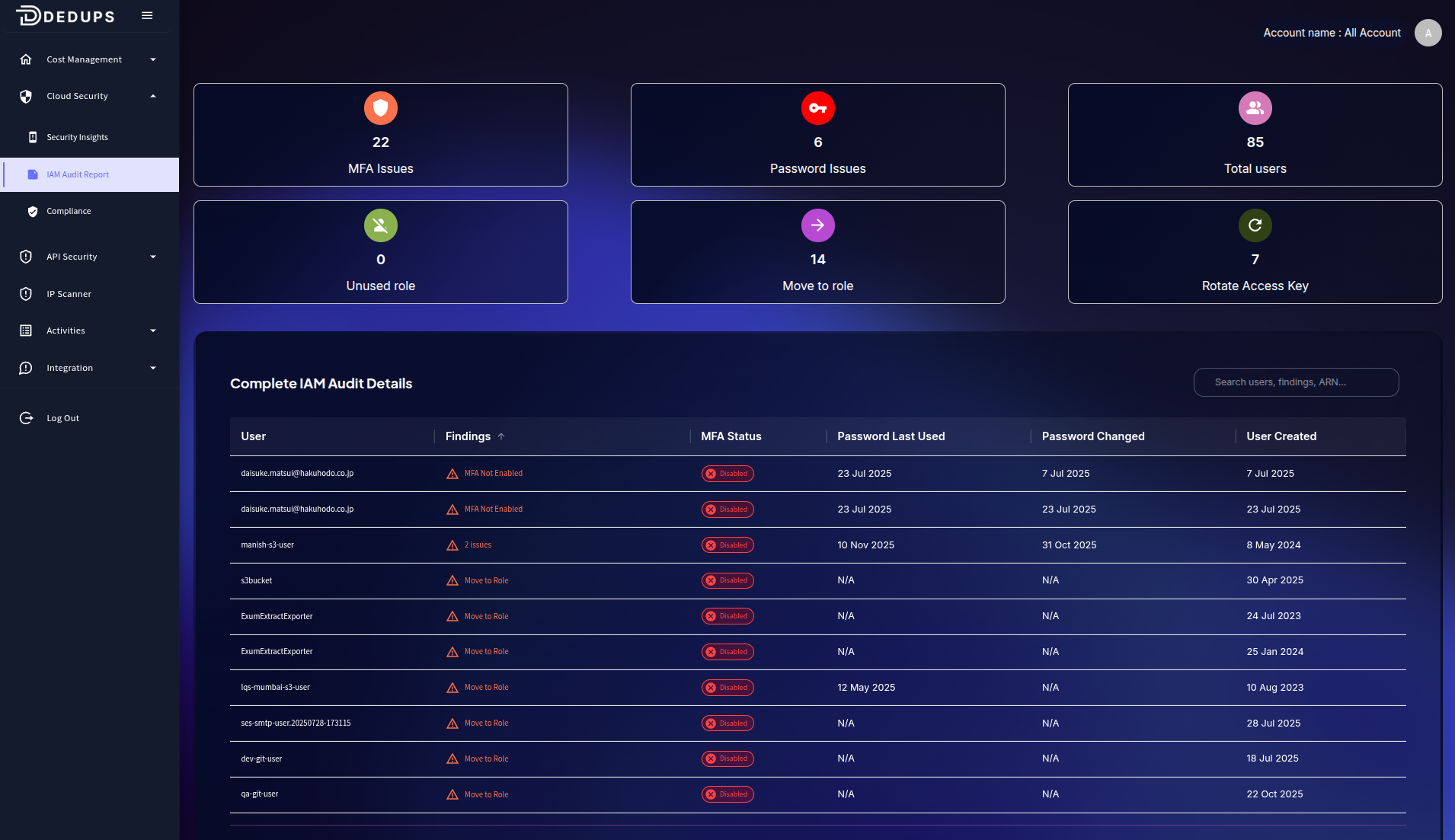
In AWS IAM environment has several users with security risks such as missing MFA, outdated passwords, and long-lived access keys. The recommendations below help you identify which accounts need attention to improve compliance and reduce exposure to unauthorized access.
What This Page Shows
- Users who have MFA disabled
- Users needing password rotation
- Users who should migrate to IAM roles
- Accounts with stale or unused access keys
- Newly created or inactive IAM users
Each finding includes a suggestion explaining what the issue is and how to fix it, helping maintain strong IAM security across all AWS accounts.
Suggestion Details
1. MFA Not Enabled
Suggestion:
This user does not have Multi-Factor Authentication (MFA) enabled. Without MFA, only a password protects the account, which increases vulnerability. Enable MFA to strengthen login security.
2. Password Issues
Suggestion:
This user has password-related risks, such as an old, unused, or unchanged password. Rotating passwords regularly reduces the chance of compromise.
3. Move to Role
Suggestion:
This user is relying on long-term IAM credentials. AWS recommends using IAM roles instead to eliminate persistent keys and improve overall security.
4. Rotate Access Key
Suggestion:
This user’s access key is old or has not been rotated recently. Long-lived keys increase the risk of exposure. Rotate the key to maintain best practices.
5. Unused Role / Inactive User
Suggestion:
This user or role has not been used for a long time. Consider disabling or removing it to reduce unnecessary security risk.
6. Multiple Issues
Suggestion:
This user has multiple security concerns. Review and resolve all findings to improve the user’s security posture.
Security Compliance Overview
The Security Compliance Overview page provides a high-level summary of your organization’s compliance posture across multiple cloud security and regulatory frameworks. It helps you quickly understand where you stand, how many controls are passing or failing, and which frameworks require attention.
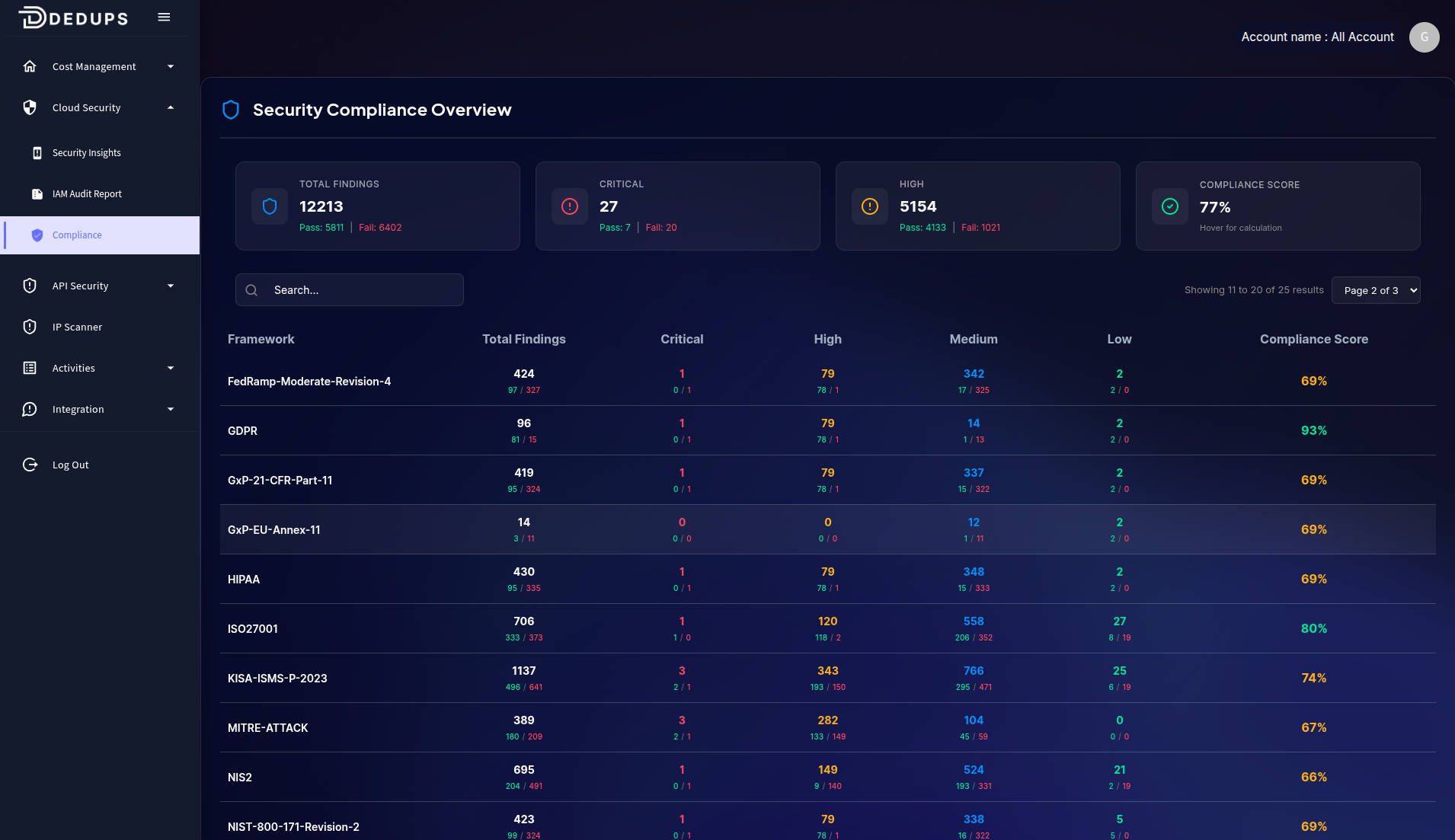
What This Page Shows
Total Findings
Displays the total number of compliance checks evaluated across all frameworks, broken down into:
- Pass – Controls that meet compliance requirements
- Fail – Controls that are not compliant and require action
This gives an immediate view of your overall compliance health.
Severity Breakdown
Findings across frameworks are categorized by severity:
- Critical – Issues that pose significant security or compliance risk
- High – Important findings that need timely remediation
- Medium – Moderate-risk compliance gaps
- Low – Minor issues or informational findings
This helps prioritize issues based on business impact and urgency.
Framework Summary Table
Each framework in the list includes:
- Total Findings (Pass / Fail)
- Critical, High, Medium, Low severity counts
- Compliance Score (%) indicating how well the environment aligns with each framework
Use this table to compare compliance levels, identify weaker frameworks, and plan remediation efforts.
How to Use This Page
- Focus first on frameworks with low compliance scores
- Prioritize remediation of Critical and High findings
- Track improvements by monitoring pass/fail trends
- Use the search and pagination to navigate large datasets efficiently
This page allows security teams to maintain visibility across audit requirements and stay prepared for assessments.
Compliance Framework Detail Page
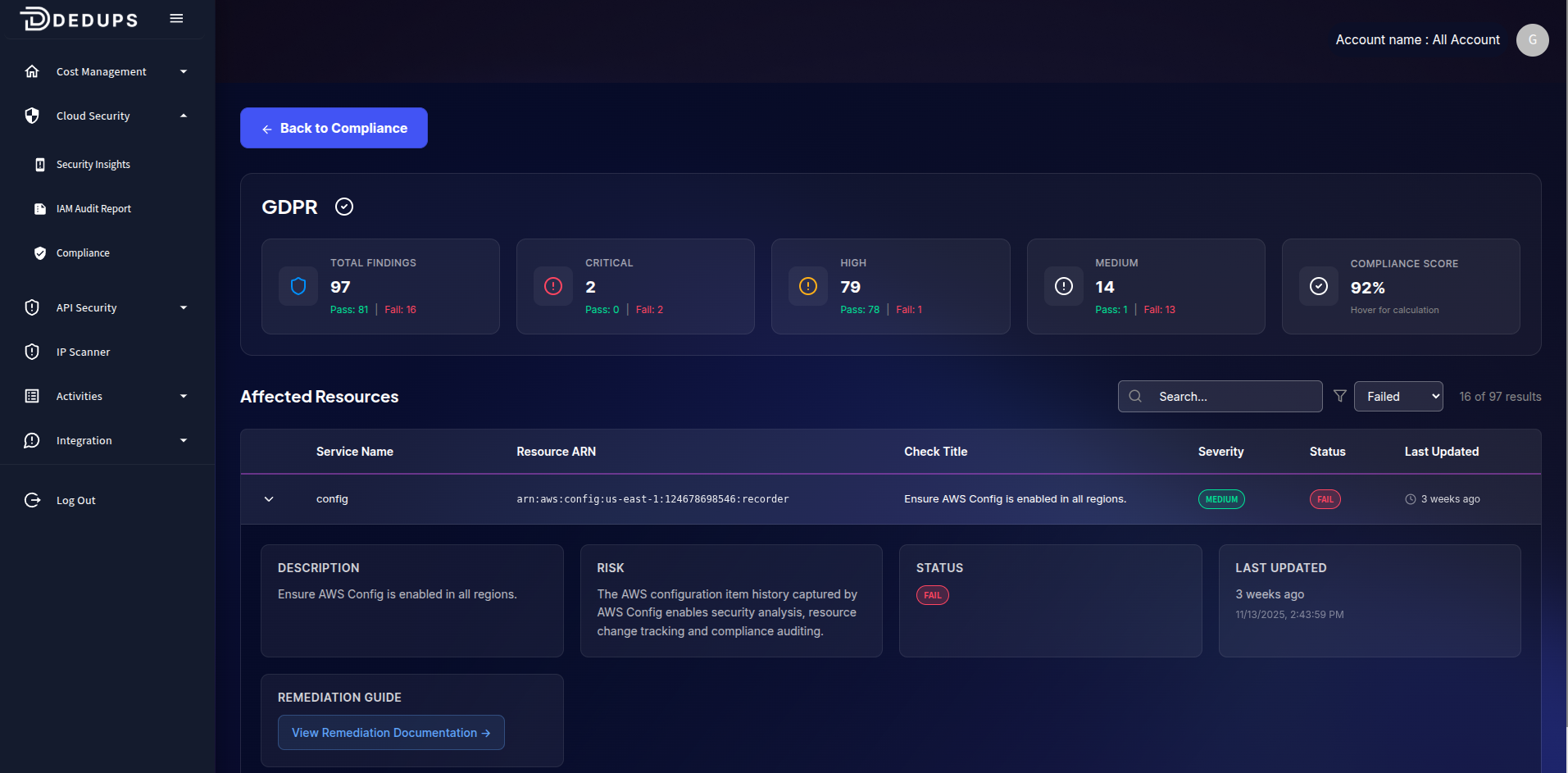
The Compliance Detail page provides a deeper look into a specific framework such as GDPR, HIPAA, ISO27001, or NIST. It breaks down individual failed and passed controls so you can take targeted remediation actions.
What This Page Shows
Framework Summary
At the top of the page, you’ll find:
- Total Findings (Pass / Fail)
- Critical, High, Medium issue counts
- Overall Compliance Score
This gives you a quick understanding of how well your cloud environment adheres to the selected compliance standard.
Affected Resources
This section lists every resource that failed or passed a compliance check, including:
- Service Name
- Resource ARN
- Check Title
- Severity (Critical, High, Medium, Low)
- Status (Pass or Fail)
- Last Updated timestamp
Use the search bar and filters to locate specific findings quickly.
Detailed Finding View
When expanding a failed check, you’ll see:
Description
A clear explanation of what the control requires.
Example: “Ensure AWS Config is enabled in all regions.”
Risk
Why this finding matters and what security or compliance risk it introduces.
Example: “The AWS configuration history provides visibility for security analysis, resource tracking, and compliance auditing.”
Status
Indicates whether the resource is Pass or Fail.
Last Updated
Shows when this check was last evaluated, helping you identify stale or outdated results.
Remediation Guide
Provides direct links or steps for resolving the issue.
Example: “Enable AWS Config Recorder in all regions.”